See Lickety in action.
Watch how drivers claim appointments, track deliveries in real time, and stay on schedule — all from one app.
New to Lickety? The app walks you through it.
When you first sign in, Lickety launches an interactive guided tutorial right inside the app. Follow step-by-step tooltips through a sandbox environment — browse demo appointments, join a queue, claim a load, and confirm delivery — all without affecting real data.
You can restart the tutorial any time from your profile settings.
Short walkthroughs of the key features.
Each video is under 60 seconds. Watch in any order — they stand alone or play as a sequence.
Claiming your first appointment
Browse available loads, check pickup and delivery windows, and claim an appointment in seconds.
~60 secReal-time GPS tracking
See how Lickety tracks your route, calculates distance, and updates your status color automatically.
~45 sec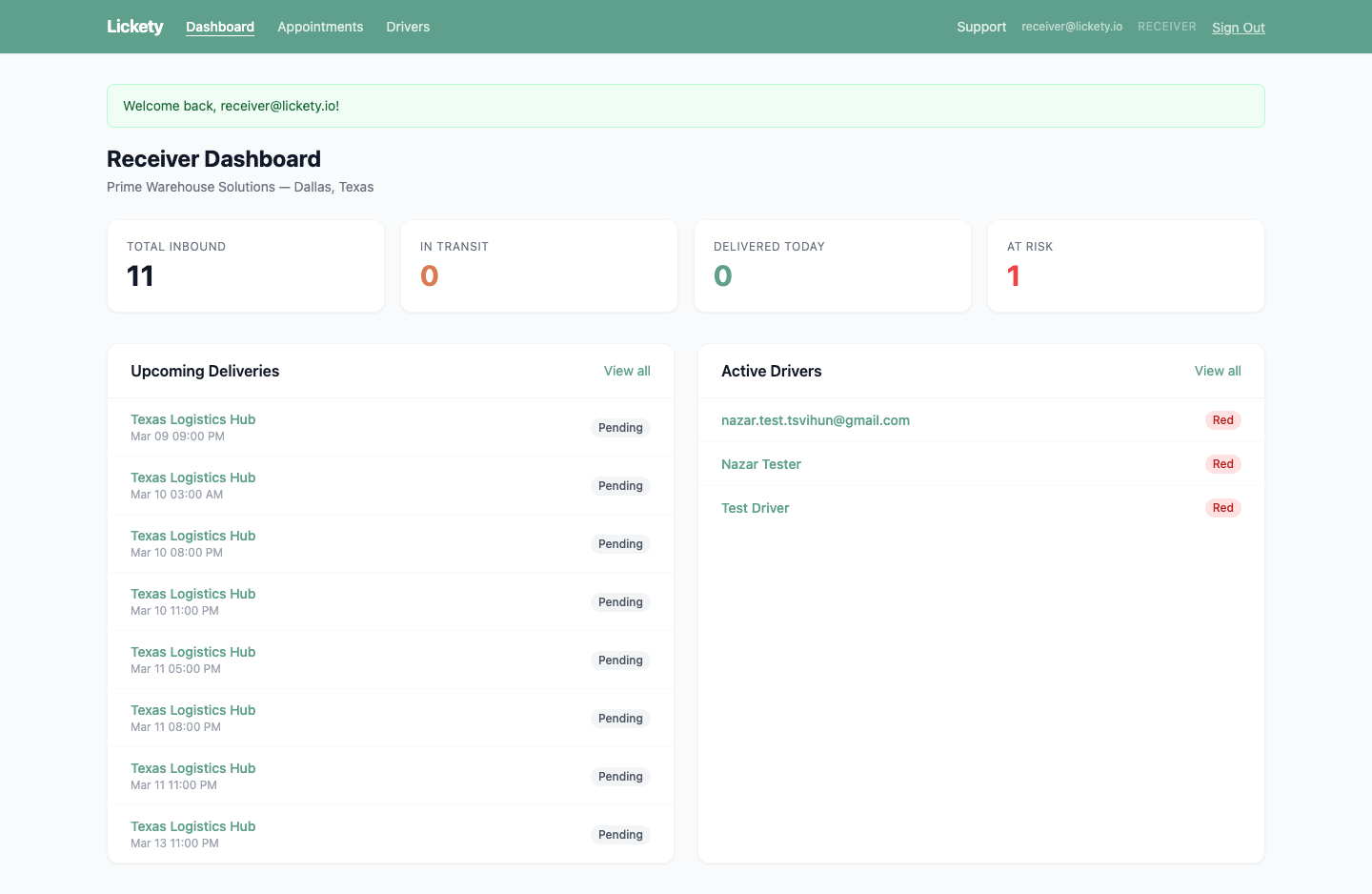
Receiver portal
Monitor inbound appointments, active drivers, and at-risk deliveries from a real-time web dashboard.
Learn more →Follow a typical delivery, start to finish.
A recording from the real app — browse appointments, check availability, and watch the tracking loop come alive.
Watch Lickety in action
This recording walks through the real app — from the home screen to browsing appointments, checking availability, and navigating the driver experience.
Live GPS & status tracking
See how the map updates in real time, distance and ETA recalculate automatically, and your status color shifts from green to yellow to red as deadlines approach.
Queue & notifications
No slots available? Join the queue for a location and get a push notification the moment something opens up. Manage your queues right from your profile.
Everything, broken into simple steps.
Four short guides covering driver onboarding, status colors, appointment management, and the receiver portal.
- Download and sign up. Get Lickety from the App Store or Google Play. Create your account with an email and password.
- Enable location services. When prompted, allow location access. This is required for GPS tracking and distance calculations. Select "Always Allow" for best results.
- Find an appointment. Open the Availability tab (or start from Home). Browse available loads — each card shows pickup and delivery windows and locations.
- Claim it. Open a load, review the details, then tap Claim Appointment. Once claimed, your home screen switches to tracking mode.
- Drive and track. Lickety monitors your GPS automatically. Watch your status color — green means on schedule, yellow means watch out, red means at risk of being late.
- Confirm pickup and delivery. When you arrive at the shipper, confirm pickup. When you arrive at the consignee, confirm delivery. Done.
Lickety uses a simple color system to show your on-time status at a glance.
You're within the safe distance range for your pickup or delivery window. Keep it up.
You're approaching the distance threshold. You'll likely make it, but keep an eye on the clock.
You're outside the expected distance for the remaining time. The app will send you a push notification.
You don't have an active appointment, or the appointment has expired.
- Viewing appointment details
Tap the "Appointment" tab in your bottom navigation. You'll see the full details: pickup and delivery windows, shipper and consignee addresses, and your current distance and ETA.
- Confirming pickup
When you arrive at the shipper and load the freight, tap "Confirm Pickup." This updates your status and shifts your GPS tracking target to the delivery location.
- Confirming delivery
When you arrive at the consignee and offload the freight, tap "Confirm Delivery." This completes the appointment and returns you to the available appointments view.
- Releasing an appointment
Need to drop an appointment? Tap the release option on the appointment details screen. The appointment will go back into the available pool for other drivers.
Receivers, shippers, and carrier admins get access to the Lickety web portal. See the full portal overview or read the highlights below.
- Dashboard
Your overview: total inbound appointments, in-transit count, today's deliveries, and at-risk loads. The dashboard also shows upcoming deliveries and active drivers with their current status colors.
- Appointments
View all appointments assigned to your facility. Filter by status, see pickup and delivery windows, and click into any appointment for full details including shipper info, driver assignment, and current status.
- Drivers
See all drivers currently en route to your facility. Each row shows the driver's name, email, and real-time status color.
- Multi-role access
The portal supports multiple roles: Receivers monitor inbound loads, Shippers create and manage outbound loads, Carrier Admins manage drivers and fleet-wide appointments, and Super Admins have full system access.
Start delivering smarter today.
Download Lickety for iOS or Android. The in-app guided tutorial takes about three minutes.